

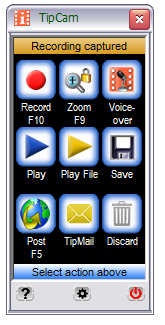
 Download TipCam, the easiest-to-use, FREE screen recorder for Windows XP and Vista:
TipCam is a new screen recording software for Windows similar to other screencasting tools like Jing, Camtasia Studio or Camstudio.
You can record video of the full desktop screen or just a portion. The application also supports Pan & Zoom so the recording area can easily follow the movements of your mouse cursor - very useful when making videos for the small screen like an iPod.
Another unique feature - it is possible record a remote computer screen with TipCam provided that computer is running the VNC server.
Like the Jing Project, TipCam also provides an online space (250 MB) where your screencast videos are automatically uploaded after production.
While Jing and Camstudio render the desktop screen recording video in SWF format, TipCam uses Flash Video (FLV) which always find more convenient especially when the screencast size is more than a few hundred kilobytes.
Sites like Blip.tv support FLV format and therefore the screencast video quality is preserved as the video need not be re-encoded before streaming
What is special about TipCam?
* One-click record, one-click share:
o Easy and intuitive controls
o Record up to 20 minutes of video New!
o Recorded video is ready for review and sharing instantly
o One click to upload or email the video
o Store for private use or share with friends, coworkers or everyone
* Voice-over New!
o If you make a narration mistake, you can redo just the audio.
o Or, first record the video without audio. Then record your narration.
* Mini-bar New!
o You can choose to display a miniture control pad while recording
o Minimizes the screen space occupied by TipCam in your videos
* Facebook application for sharing your new videos on Facebook
* De facto web-standard video format
o Flash Video (FLV)
o Optimized for web delivery
o Viewable by anyone anywhere with nothing to download
o Full motion video with audio
* Smart panning
o Zooming window can be fixed or follow your mouse cursor
o Adjustable zooming window during recording
* Free style hand drawing markup during recording
* Capable of recording screen activities remotely
Home Page
http://www.utipu.com/app/
Download
http://www.utipu.com/tipcam/utipusetup.exe
http://www.utipu.com/app/
Download
http://www.utipu.com/tipcam/utipusetup.exe
0 comments:
Post a Comment